How to change the password for a Reseller user
Sometimes you may need to change the password for a user under your Reseller Package. Fortunately, you can do this easily, without having to know the user's password.
1. Log in to your Reseller package.
You can easily log in to your Reseller Package directly from the Theory7 Dashboard.
-
Log in to My Theory7
-
Click Dashboard followed by Dashboard.
- Click the Reseller package you want
- Under "One Click Login", click Direct Admin
2. Change the password
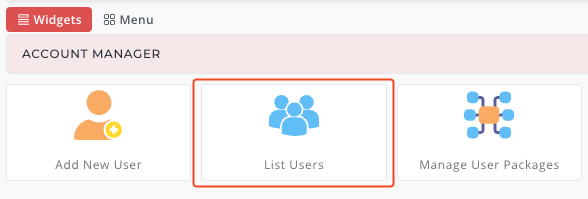
You now see an overview of all options, including "List Users", where you can manage and edit your users. Next, we go to the user you want.
- Click "List Users":
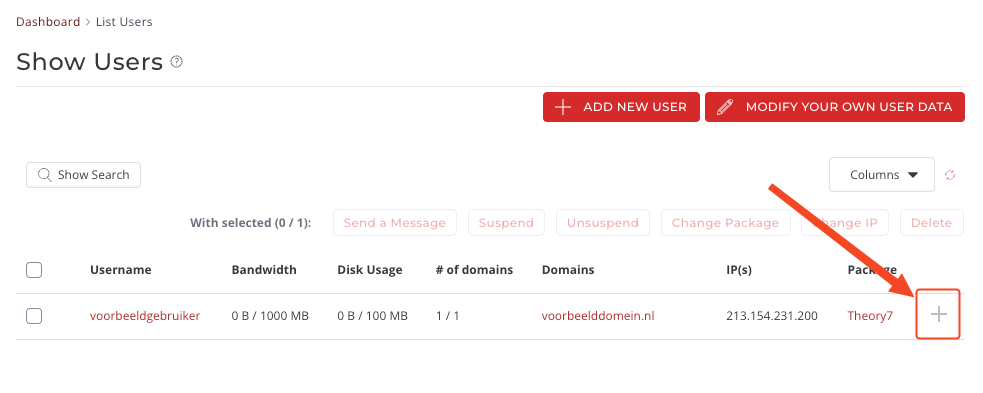
- You now see all your users. Next to each user there is a "+" icon; click it.
- A pop-up now appears where you can click "Change Password". When you click it, you can set the password you want, either manually or by clicking the dice*.
*If you click the dice, the system automatically generates a strong password for the user.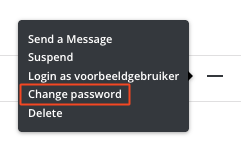
You have now changed the password!
3. Share the password with the user
Now that you have changed the password, you can share it with the user. You can of course do that by contacting them yourself or by sending an automated email. That is what we will do now.
-
In the same screen, click: "resend welcome email"
-
Enter the user's email address, or use the existing email address.
- Click "Resend"
The user has now received their password by email and can log in again right away.
Still stuck? Feel free to contact us. We are always happy to help!
Looking for reseller hosting? See our plans.
0 van 0 vonden dit nuttig
