LiteSpeed Cache for WordPress: Setup and Optimization
Want to make your WordPress website lightning fast? Then the LiteSpeed Cache plugin is the solution! With caching, optimizations and image compression, this plugin delivers extremely fast load times. In this article we explain how to install, configure and fine-tune the plugin.
💡 Good to know: With Theory7.net WordPress Hosting, LiteSpeed Cache is installed automatically on every WordPress website. So you don't have to do anything manually!
Why LiteSpeed Cache?
LiteSpeed Cache (LSCWP) is a powerful all-in-one caching solution for WordPress. The benefits:
✅ Faster load times: Thanks to server-side caching and advanced optimizations.
✅ Better SEO ranking: Faster websites score better in Google.
✅ Lower server load: Efficient use of resources improves performance.
✅ Image optimization & lazy load: For even faster performance.
✅ Compatible with WooCommerce: Perfect for online stores!
1. Installing the LiteSpeed Cache plugin
💡 Not needed at Theory7, because LiteSpeed Cache is already installed automatically!
For other hosting providers (why would you? 😉):
- Go to WordPress Dashboard > Plugins > Add New Plugin
- Search for "LiteSpeed Cache
- Click Install Now and then Activate
You now see a new menu item: LiteSpeed Cache.
2. Basic configuration: essential settings
In your WordPress dashboard, go to LiteSpeed Cache and set the following options:
🔹 Enabling caching
- Go to Cache > Set Enable Cache to On
- Turn on Mobile Cache (for mobile speed)
- Turn off Private Cache (except for login sessions)
🔹 Optimization settings
📌 Go to Page Optimization and enable the following options:
- CSS Minify & JS Minify (makes files smaller)
- CSS Combine & JS Combine (reduces HTTP requests)
- Lazy Load Images (loads images only when they come into view)
- HTML Minify (makes the HTML code smaller)
🔹 Database optimization
- Go to Database > Click Optimize
- Delete revisions and spam comments
🔹 Image compression
- Go to Image Optimization and start an optimization scan
- Use Lossless Compression to preserve image quality
3. Optimization for maximum speed
For the best performance, use these settings:
✅ Cache TTL: Set to 86400 seconds (1 day)
✅ Object Cache: Enable Redis if available
✅ Browser Cache: On, so visitors don't reload everything every time
✅ Heartbeat Control: Lower the frequency for less server load
💡 Extra tip: Use a CDN (for example QUIC.cloud) to get faster load times worldwide.
4. How does LiteSpeed Cache help your SEO?
🚀 Faster websites rank higher in Google. Google rewards fast sites with better rankings, lower bounce rates and higher conversion.
🔹 Better Core Web Vitals: Google's measurements for speed and user experience improve.
🔹 Faster loading = lower bounce rate: Visitors stay longer.
🔹 Less server load: Your website stays stable, even with lots of traffic.
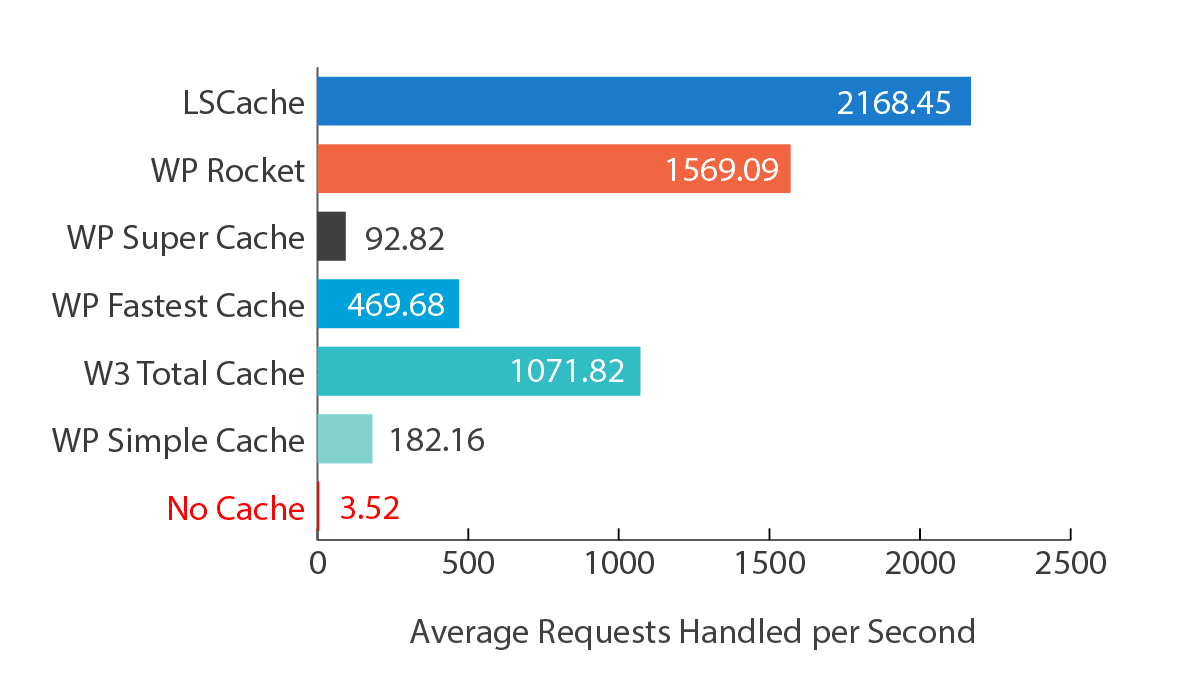
🔎 Proof that it works? Theory7 runs entirely on LiteSpeed Cache and is therefore the fastest hosting provider in Europe!
📊 Performance test:
👉 Without LiteSpeed Cache: 2.5 seconds load time
👉 With LiteSpeed Cache: 0.8 seconds load time!
🎯 Want a super-fast WordPress site too? Check out our lightning-fast WordPress Hosting!
5. Frequently asked questions & problems
❓ Why isn't caching working?
🔹 Caching may not be enabled in the settings yet.
🔹 Try clearing the cache via LiteSpeed Cache > Purge All.
❓ My website looks strange after optimization!
🔹 Turn off CSS/JS Combine and test again.
🔹 Add problem scripts to the exclusion list under Page Optimization.
❓ Which extra plugins work well with LiteSpeed Cache?
- QUIC.cloud CDN (for worldwide speed improvements)
- WP Compress (for image optimization)
- WP Rocket (can partly work alongside it, but is not needed with LiteSpeed Cache)
LiteSpeed Cache + Theory7 = The fastest WordPress hosting!
With LiteSpeed Cache your website becomes lightning fast, which leads to better SEO, higher conversions and a faster user experience.
Why make it hard when it can be easy? 💡 With Theory7 WordPress Hosting, LiteSpeed Cache is already installed automatically and optimized.
🔹 Get started right away with the fastest WordPress hosting in Europe! 🚀
0 van 0 vonden dit nuttig
